Most people using Claude are leaving its best feature on the table.
They've maybe set up a Project or two. Maybe uploaded some docs. But they're treating Claude like a fancy search engine instead of what it actually is — a thinking partner that can learn how you work.
The unlock? Understanding the difference between Projects and Skills. And more importantly, knowing when to use which.
I run my entire consulting business on Claude. Not as a side tool — as the operating system. I have 14 custom Skills and a handful of Projects that handle everything from client proposals to daily check-ins to this blog post. So this isn't theory. This is what I use every day.
Let me break it down.
What Are Claude Projects?
A Project is a dedicated workspace with its own context. Think of it like a desk you set up for a specific job — it has all the relevant files, reference materials, and instructions Claude needs for that particular body of work.
When you create a Project, you can:
- Upload documents Claude should reference (research, specs, brand guides, whatever)
- Write custom instructions that tell Claude how to behave in this workspace
- Build up conversation history over time
- Share it with team members (on Team and Enterprise plans)
Everything inside a Project stays inside that Project. The docs you upload, the instructions you write, the context you build — none of it carries over to other Projects or regular chats.
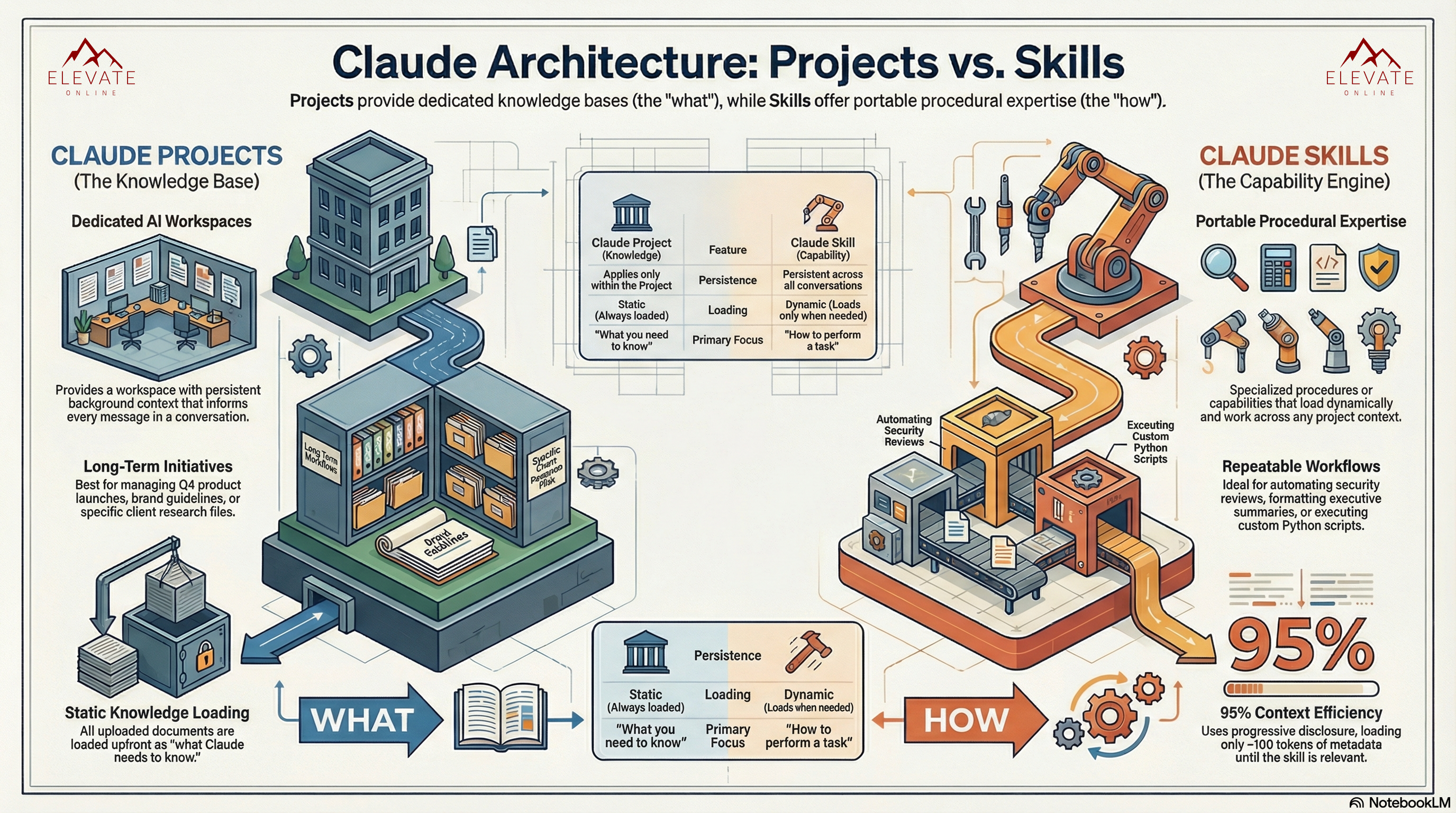
The key concept: Projects are about WHAT Claude needs to know.
When I Use Projects
I have a Project called "Elevate Strategic Advisor" that holds my OKRs, my pipeline data, my pricing philosophy, and detailed instructions for how Claude should operate as my business copilot. Every time I open a chat in that Project, Claude already knows my revenue targets, my active opportunities, and my decision-making frameworks.
I have a separate Project for each client engagement. My Skin Equity Project has their brand guidelines, EMR requirements, and all the context from our work together. When I open it and say "draft an update for Dr. Boateng," Claude already knows who that is and what we've been working on.
Projects are perfect for:
- Ongoing client work where context accumulates
- Internal business operations (strategy, pipeline, OKRs)
- Research that builds on itself over time
- Anything where Claude needs persistent background knowledge
What Are Claude Skills?
Skills are where it gets interesting — and where most people haven't caught up yet.
A Skill is a set of instructions, scripts, and resources that teach Claude how to perform a specific task. Unlike Projects, Skills aren't tied to one workspace. They're portable. Create a Skill once, and it works everywhere — in regular chats, inside any Project, across all your conversations.
The other thing that makes Skills powerful: they load dynamically. Claude only pulls in a Skill when it's relevant to what you're asking. So even if you have 14 Skills (like I do), you're not burning through your context window. Claude reads the Skill names and descriptions, figures out which ones matter for the current task, and loads only those.
The key concept: Skills are about HOW Claude should do things.
My Actual Skills (and What They Do)
I'm not going to give you a hypothetical example. Here's what I actually built:
Proposal Generator — I paste in discovery call notes and get a full client proposal in my voice, with my pricing structure, my format, my ROI framing. What used to take me an hour takes seconds.
Sales Call Analyzer — I drop in a call transcript and get scored on my performance using Hormozi, Sandler, and Challenger Sale frameworks. It tells me what I missed, where I left money on the table, and what to do differently next time.
Pre-Call Prep — I give it a prospect's name and it researches them, pulls relevant context, and builds me a call brief with suggested questions and talking points.
SOW Generator — After a proposal is accepted, I generate a full 10-section Scope of Work with deliverables, exclusions, payment terms, and legal clauses.
OKR Manager — Tracks my quarterly goals, runs weekly check-ins, scores my progress, and calls me out when I'm falling behind.
LinkedIn Post Generator — Writes posts in my actual voice (not generic AI voice) with hooks, structure, and CTAs optimized for engagement.
Every single one of these used to be manual work. Now it's a sentence.
When to Use Skills
Skills are perfect for:
- Repeatable tasks you do across different contexts
- Anything where you find yourself writing the same instructions over and over
- Workflows that should be consistent regardless of which Project you're in
- Processes you want to package and share (or eventually sell)
The Real Difference: WHAT vs. HOW
Here's the simplest way to think about it:
Projects = "Here's what you need to know" — the context, the background, the knowledge base.
Skills = "Here's how to do this" — the procedures, the workflows, the repeatable processes.
A Project might contain all the details about a client engagement. A Skill might teach Claude how to generate proposals for any client. The Project provides the raw material. The Skill provides the method.
And the real pro move? Using them together.
When I sit down to write a client proposal, I open my Strategic Advisor Project (which has my pricing philosophy, pipeline data, and discovery call notes) and say "generate a proposal for this client." Claude loads the context from the Project AND triggers the Proposal Generator Skill. The Project provides the what. The Skill provides the how. Together, I get a proposal that's contextualized and consistently formatted.
Projects vs. Skills: Quick Reference
| Projects | Skills | |
|---|---|---|
| Scope | One workspace | Works everywhere |
| What it holds | Documents, instructions, chat history | Procedures, scripts, resources |
| Loading | Always loaded (static) | Loads only when needed (dynamic) |
| Primary focus | "What Claude needs to know" | "How to perform a task" |
| Best for | Ongoing work with accumulating context | Repeatable workflows across contexts |
| Context cost | Higher (everything loads every time) | Lower (progressive disclosure) |
| Persistence | Within the Project only | Across all conversations and Projects |
Common Mistakes I See
Putting procedures in Project instructions when they should be Skills. If you're copying the same instructions across multiple Projects, that's a Skill. Pull it out, package it once, and let it work everywhere.
Using Skills for context that should live in a Project. A Skill shouldn't hold 50 pages of reference material. That's what Projects (and their document upload) are for. Skills should be focused procedures, not knowledge dumps.
Not using them together. The real power isn't Projects OR Skills — it's Projects AND Skills working in tandem. Context + capability.
Over-building before you need it. Start with one Project and one Skill. Get comfortable. Then expand. Don't try to architect an entire system on day one.
How to Get Started
If you're new to Claude beyond basic chatting, here's what I'd do:
Step 1: Create your first Project. Pick the area of your work where you need Claude to have persistent context. Upload the relevant docs. Write a few instructions about how you want Claude to behave. Start chatting.
Step 2: Notice what you repeat. After a week or two of using your Project, pay attention to the instructions you find yourself typing over and over. "Format this as a..." or "Analyze this using..." or "Write this in the style of..." — those are your future Skills.
Step 3: Build your first Skill. Take one of those repeating patterns and turn it into a Skill. You can create custom Skills by going to Settings > Capabilities > Skills. Start simple — even a short set of instructions will save you time. If you want to go deeper on structuring Skills well, Anthropic's Skill authoring best practices doc is the definitive guide — it covers everything from naming conventions to progressive disclosure to testing across models.
Step 4: Combine them. Use your Project for context and your Skill for execution. This is where the compounding starts.
Why This Matters More Than You Think
ChatGPT has Projects too. Other AI tools have various versions of workspace context. But Skills — portable, dynamic, reusable procedures that load only when needed? That's where Claude pulls ahead.
I went from spending hours on proposals, call prep, and daily planning to getting most of it done in seconds. Not because I'm some technical wizard — because I understood the architecture and built around it.
The people getting the most out of AI right now aren't the ones with the best prompts. They're the ones who've built systems. Projects and Skills are how you build those systems in Claude.
I'm building a course around exactly this — how to set up Claude as your AI operating system for business. If that's interesting to you, check out claudeforeveryone.com for early access.
Nicole Patten is an ex-Google Senior Engineer and founder of Elevate Online, an AI consulting firm helping businesses automate with systems that pay for themselves. She writes about practical AI implementation at elevateonline.com/blog.